
Probably Stolen Vending Machine: Setup and Sales
Get the vending machine through its starting perk or Wild's Network, put an energy cell in its power slot, load accepted goods, and collect the cash after overnight sales. The sale proceeds stay inside the machine until you transfer them.
Choose an acquisition route
The release-era perk screenshot shows a two-point Vending Machine start. Wild's Network offers a purchase route; a landlord offer is also documented, but can add recurring rent. Compare the actual offer in your run. Published quotes differ, so neither a universal unlock price nor a guaranteed landlord day is used here.
Load stock and supply power
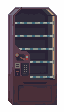
Open the machine outside the shop window. Its panel separates the battery, Inventory, Core and cash controls. Start with a small selection of owned, legal goods that the inventory accepts. Check the cell against the machine's nightly requirement before sleeping. A Material Neon Sign is not established as an activation prerequisite.
Collect cash and restock
After the night, reopen the machine and use Transfer All to move stored Credits into your balance. Compare stock before and after before assuming a failed payout. Version 1.0.0.12 fixes dialogue payment choices not updating immediately after such a withdrawal and prevents Intake or Outlet Hoppers inside it from being sold.
Diagnose a quiet night
Check power, accepted inventory and the actual quality of the goods. Eligible stock does not guarantee that every item sells. Keep a mixture while learning demand, and compare several nights before committing your rent reserve. The Core offers storage and attractiveness upgrades; read its material and power requirements before spending.
FAQ
Does it sell after the shop closes?
Yes. Official 1.0 release material describes overnight sales.
Why did my personal cash not increase?
Sales money remains in the machine. Open its cash controls and transfer the proceeds.