
Probably Stolen Perks: Points, Slots and Choices
Starting Perks modify a new run before the first business day. They are powerful because they can change money, reputation, inventory, or challenge conditions, but the system has three separate limits: points, slots, and incompatible combinations.
Quick answer
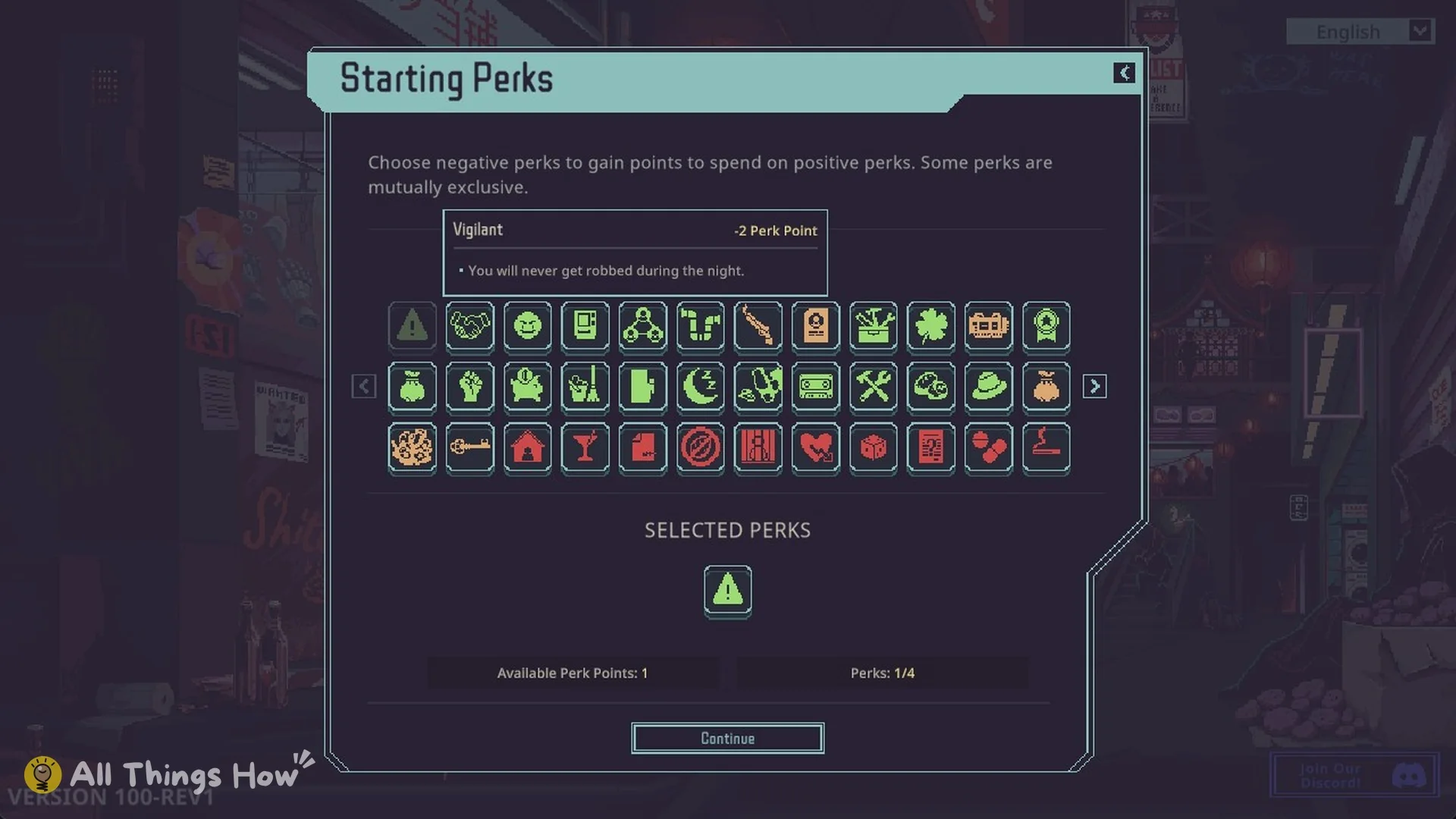
Starting Perks are locked on your first completely new game and become available on later starts. The default setup gives you 3 Perk Points and 4 Perk Slots. Positive perks spend points, negative perks return points, and every selected perk still uses a slot unless the current UI explicitly says otherwise.
Why you cannot select perks on the first save
The first new game introduces the core scenarios without Starting Perks. Once you have created and saved that initial run, later new games display the perk-selection screen. If the feature is missing from your very first start, continue normally rather than troubleshooting the installation.
Starting Perks are different from Faction Perks. Starting Perks are selected during run creation; Faction Perks unlock inside a run through reputation thresholds.
Points, slots, and negative perks
The default rules are:
- Up to 3 points may be spent.
- Up to 4 perks may be selected.
- Positive perks consume points.
- Negative perks return points.
- A negative or neutral perk still occupies a slot.
This means a mathematically affordable setup can still fail because it uses too many slots. Conversely, four cheap perks may fit the slot limit but exceed the point limit.
Oddball can change the available slot arrangement, but it has its own cost and opportunity tradeoff. Read the current UI rather than assuming it simply adds a free fifth choice.
Why a valid-looking combination will not start
Some perks are mutually exclusive. The creation screen checks compatibility in addition to points and slots. If Continue remains unavailable:
- Confirm the total point balance.
- Count every selected perk, including negative ones.
- Read the warning attached to each choice.
- Remove one perk from an opposed pair and test again.
Do not use a complete Demo-era cost table for this check. Starting Perks were rebalanced before the full release.
Choosing perks by playstyle
There is no universal best set because the scenario applies its starting package before perk adjustments. A money modifier that feels minor in one scenario can change the entire opening of another.
First-time standard run
Prefer forgiving economic or utility effects that support your chosen scenario without adding a complex failure condition. Avoid combining several negative perks simply to purchase one flashy bonus; the extra restrictions can cost more than the bonus earns.
Production-focused run
Choose perks that support the chain you already intend to operate. A production bonus has little value if you still lack the inputs, power, or buyer for the output.
Scavenging or Rock Bottom run
Prioritize survival and early access to resources. These starts can benefit from strong tradeoffs, but a challenge-video setup is not automatically the best choice for a first attempt.
Water, Chemistry, or Rats
Use perks that preserve the route's operating budget and obligations. Specialized scenarios can fail when a negative perk interferes with their supply, reputation, rent, or time requirements.
How many Starting Perks are in the game?
Current data records 48 Starting Perks. Older guides that list 36 may reflect a pre-release build or only the perks visible in one portion of the interface. Because balance updates can change cost or availability, use the game screen for the final selection.
Check a build in three passes
First inspect the point balance shown by the creation screen. Adding a negative perk can make a positive choice affordable, but the negative effect becomes part of the run as well. Treat it as an ongoing condition rather than free credit for a stronger bonus.
Next count the occupied slots, including negative and neutral selections. Refunding points does not refund the slot used by that choice. Finally read compatibility warnings; a build can satisfy both numerical limits and still contain mutually exclusive selections.
This method is useful when changing a familiar setup. A choice that appears cheap in isolation can prevent the combination you actually wanted. Finish by reading the full starting configuration, because scenario resources and perk adjustments jointly determine the opening position.
Choosing restrictions you can manage
Consider how a negative choice interacts with the routine you plan to use. If your route relies on a particular supply chain or reputation direction, a conflicting restriction can undermine it even when the point balance looks generous. Judge the whole run rather than ranking perks by their headline effect.
A new player choosing perks on a later save still benefits from a simple setup. Learn what each restriction changes before stacking several challenges. A specialized build can be effective for its creator without being a dependable beginner recommendation.
待确认 (Pending confirmation): complete Mind Reprogrammer removal costs and cooldowns, localized names for every perk, and whether mods change the visible count. This page covers creation rules, not a freshly verified cost table for all 48 recorded choices. An older Playtest cost should not override the current screen.
FAQ
Why can’t I select Starting Perks?
They are locked on the first completely new game. Create and save the initial run, then check the new-game setup on a later start.
How many perk points do I get?
The default limit is 3 points. Negative perks add points back but also add their own restrictions.
How many perks can I choose?
The default limit is four selected perks, including negative and neutral choices.
Why can’t I continue even though my points are valid?
You may have exceeded the slot limit or selected mutually exclusive perks. Check both conditions separately.
Are Starting Perks and Faction Perks the same?
No. Starting Perks customize a new run; Faction Perks are earned through reputation during play.